# Openstreetmap

# Ajouter son activité sur Openstreetmap

- Se connecter à [https://www.openstreetmap.org](https://www.openstreetmap.org)
- Se connecter ou créer un compte 
    - Grap a un compte que l'on peut partager si vous souhaitez, demandez au pôle informatique
- <span style="background-color: rgb(224, 62, 45);"> **<span style="color: rgb(255, 255, 255);">1 </span>**</span><span style="color: rgb(255, 255, 255);"> </span>Chercher le lieu dans la barre de recherche en haut à gauche  
    
    - On peut utiliser l'**Adresse copiable** dans l'annuaire d'Odoo - qui devrait fonctionner - mais la syntaxe d'adresse est des fois capricieuse donc vous pouvez chercher avec le nom de ville
- <span style="background-color: rgb(224, 62, 45); color: rgb(255, 255, 255);"> **2** </span> Zoomer sur la carte pour trouver son bâtiment
- <span style="color: rgb(255, 255, 255);"><span style="background-color: rgb(224, 62, 45);"> **3** </span> </span>Cliquer sur Modifier en haut

[![image.png](https://librairie.grap.coop/uploads/images/gallery/2024-01/scaled-1680-/Vg9image.png)](https://librairie.grap.coop/uploads/images/gallery/2024-01/Vg9image.png)

- Choisir Commencer maintenant
- On arrive sur une vue aérienne et là il y a deux choix

<details id="bkmrk-il-y-a-d%C3%A9j%C3%A0-un-local"><summary>Choix 1 : Il y a déjà un local commercial identifié sur Openstreetmap</summary>

#####   


- On va donc modifier les informations en cliquant sur l'icône <span style="background-color: rgb(224, 62, 45);">**<span style="color: rgb(255, 255, 255);"> 1 </span>**</span> déjà présente sur le plan
- Puis on remplit les infos à gauche, en commençant par le type d’élément qui caractérisera le type de commerce

<table border="1" id="bkmrk-avant-apr%C3%A8s" style="border-collapse: collapse; width: 100%;"><colgroup><col style="width: 58.9182%;"></col><col style="width: 41.0797%;"></col></colgroup><tbody><tr><td>**Avant**  
</td><td>**Après**  
</td></tr><tr><td>[![image.png](https://librairie.grap.coop/uploads/images/gallery/2024-01/scaled-1680-/1moimage.png)](https://librairie.grap.coop/uploads/images/gallery/2024-01/1moimage.png)

</td><td>[![image.png](https://librairie.grap.coop/uploads/images/gallery/2024-01/scaled-1680-/fiHimage.png)](https://librairie.grap.coop/uploads/images/gallery/2024-01/fiHimage.png)

</td></tr></tbody></table>

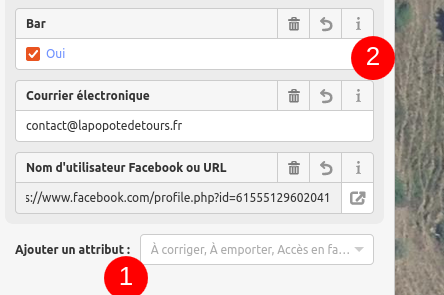
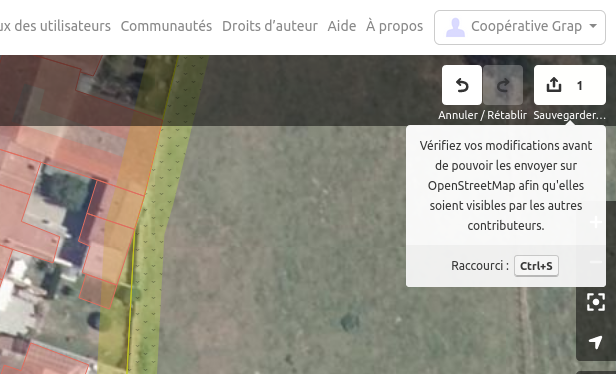
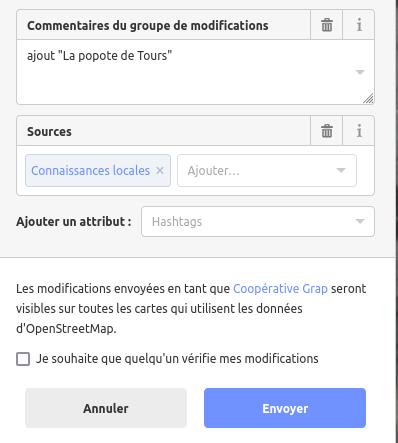
<table border="1" style="border-collapse: collapse; width: 100%; height: 119.2px;"><colgroup><col style="width: 50%;"></col><col style="width: 50%;"></col></colgroup><tbody><tr style="height: 29.8px;"><td style="height: 29.8px; vertical-align: middle;">On peut ajouter des attributs pas présent sur l'ancienne fiche</td><td style="height: 29.8px;">[![image.png](https://librairie.grap.coop/uploads/images/gallery/2024-01/scaled-1680-/nASimage.png)](https://librairie.grap.coop/uploads/images/gallery/2024-01/nASimage.png)</td></tr><tr style="height: 29.8px;"><td style="height: 29.8px; vertical-align: middle;">Puis enregistrer avec le bouton en haut à droite ⏏️

</td><td style="height: 29.8px;">[![image.png](https://librairie.grap.coop/uploads/images/gallery/2024-01/scaled-1680-/fDcimage.png)](https://librairie.grap.coop/uploads/images/gallery/2024-01/fDcimage.png)

</td></tr><tr style="height: 29.8px;"><td style="height: 29.8px; vertical-align: middle;">Et laisser un commentaire pour indiquer la modification</td><td style="height: 29.8px;">[![image.png](https://librairie.grap.coop/uploads/images/gallery/2024-01/scaled-1680-/cZeimage.png)](https://librairie.grap.coop/uploads/images/gallery/2024-01/cZeimage.png)</td></tr><tr style="height: 29.8px;"><td style="height: 29.8px;">  
</td><td style="height: 29.8px;"> </td></tr></tbody></table>

<p class="callout success">Et voilà, ça va arriver sur Openstreetmap !</p>

</details><details id="bkmrk-il-n%27y-a-rien-d%27iden"><summary>Choix 2 : Il n'y a rien d'identifié sur ce local</summary>

- Ajout un **Point** au milieu du bâtiment
- Faire tout comme le **choix 1** sauf que la fiche est vide par défaut

</details>#####