# Best of des formules !

#### <span style="font-family: Cantarell;"><span style="font-size: small;">**Avant propos : les bonnes pratiques**</span></span>

- <span style="font-family: Cantarell;"><span style="font-size: small;">Penser à **figer les plages de calcul** si vous avez l’intention de réutiliser la formule (faire glisser) avec le symbole $</span></span>
    - <span style="color: #2a6099;"><span style="font-family: Cantarell;"><span style="font-size: small;">$A6 =&gt; seule la colonne est figée</span></span></span>
    - <span style="color: #2a6099;"><span style="font-family: Cantarell;"><span style="font-size: small;">A$6 =&gt; seule la ligne est figée</span></span></span>
    - <span style="color: #2a6099;"><span style="font-family: Cantarell;"><span style="font-size: small;">$A$6 =&gt; la cellule entière est figée (ligne et colonne)</span></span></span>
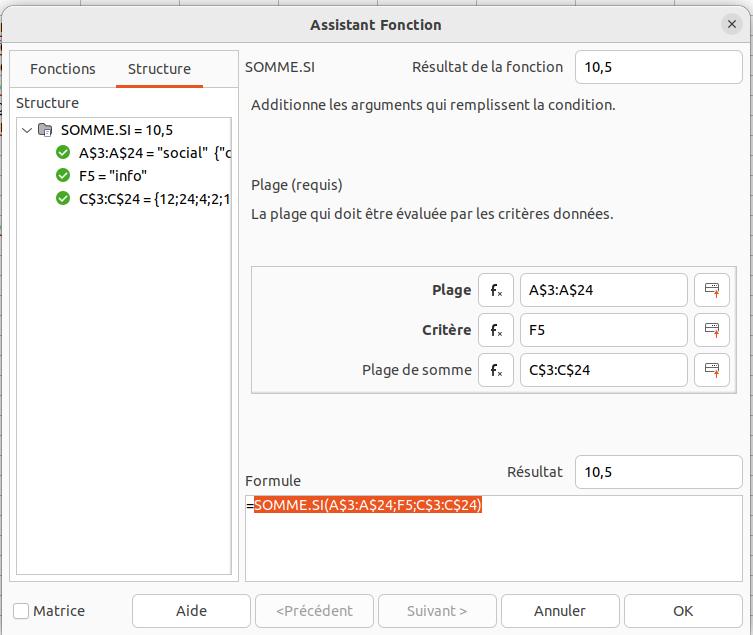
- <span style="font-family: Cantarell;"><span style="font-size: small;">Utiliser éventuellement l’**assistant de formules** pour construire la formule pas à pas : </span></span>![image.png](https://librairie.grap.coop/uploads/images/gallery/2024-12/scaled-1680-/mGDimage.png)

- ![image.png](https://librairie.grap.coop/uploads/images/gallery/2024-12/scaled-1680-/Getimage.png)
- <span style="font-family: Cantarell;"><span style="font-size: small;">En cas d’erreur, décomposer la formule, faire pas à pas pour voir à quel niveau ça bloque.</span></span>
- <span style="font-family: Cantarell;"><span style="font-size: small;"><span style="font-weight: normal;">Dans une formule, si on veut utiliser un critère de type texte, il faut l’exprimer entre guillemets (ex. SOMME.SI (A2:A25 ; </span></span></span>`"`<span style="font-family: Cantarell;"><span style="font-size: small;"><span style="font-weight: normal;">social</span></span></span>`<span style="font-size: small;"><span style="font-weight: normal;">"</span></span>`<span style="font-family: Cantarell;"><span style="font-size: small;"><span style="font-weight: normal;">)).</span></span></span>
- <span style="font-family: Cantarell;"><span style="font-size: small;"><span style="font-weight: normal;">Dans une formule, si l’on veut cibler les cases vides, il faut mettre les guillemets seuls (ex. SI(A2:A25= </span></span></span>`""`<span style="font-family: Cantarell;"><span style="font-size: small;"><span style="font-weight: normal;">; </span></span></span>`<span style="font-size: small;"><span style="font-weight: normal;">"</span></span>`<span style="font-family: Cantarell;"><span style="font-size: small;"><span style="font-weight: normal;">KO</span></span></span>`<span style="font-size: small;"><span style="font-weight: normal;">"</span></span>`<span style="font-family: Cantarell;"><span style="font-size: small;"><span style="font-weight: normal;">; </span></span></span>`<span style="font-size: small;"><span style="font-weight: normal;">"</span></span>`<span style="font-family: Cantarell;"><span style="font-size: small;"><span style="font-weight: normal;">OK</span></span></span>`<span style="font-size: small;"><span style="font-weight: normal;">")</span></span>`<span style="font-family: Cantarell;"><span style="font-size: small;"><span style="font-weight: normal;"> =&gt; si dans la plage A2&gt;A25 il y a une case vide, alors mettre « KO » sinon inscrire « OK »).</span></span></span>
- <span style="font-family: Cantarell;"><span style="font-size: small;"><span style="font-weight: normal;">C</span></span></span><span style="font-family: Cantarell;"><span style="font-size: small;"><span style="font-weight: normal;">haque parenthèse ouverte doit être fermée à un moment donné !!!</span></span></span>

<span style="font-family: Cantarell;"><span style="font-size: small;">**Calcul**</span></span>

<details id="bkmrk-sommeprod-permet-de-"><summary>Sommeprod</summary>

<span style="font-family: Cantarell;"><span style="font-size: small;">Permet de sommer seulement les données répondant à un ou plusieurs critères (comme si on filtrait dans les colonnes).</span></span>

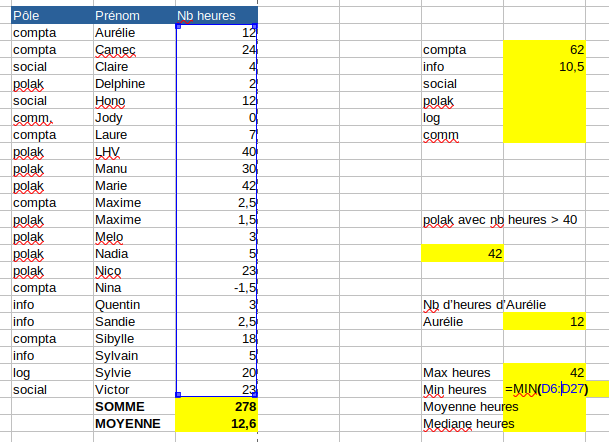
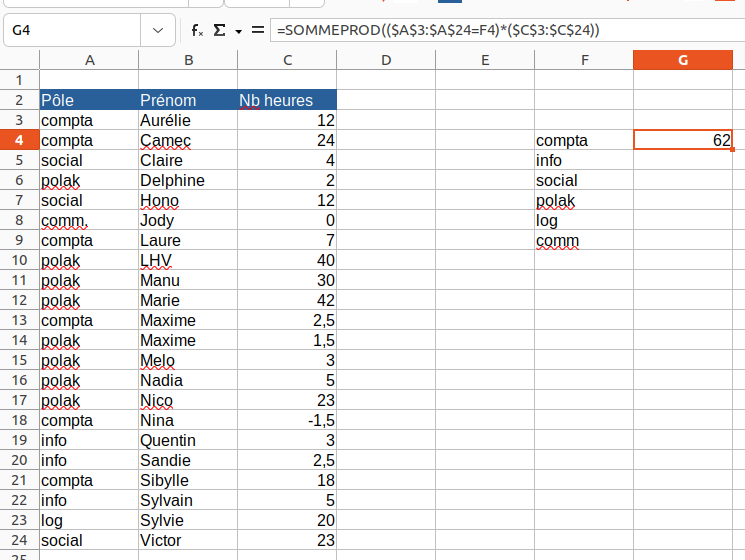
<span style="color: #808080;"><span style="font-family: Cantarell;"><span style="font-size: small;">**Exemple 1** : (les chiffres sont faux)</span></span></span>

<span style="color: #808080;"><span style="font-family: Cantarell;"><span style="font-size: small;">j’ai une liste des personnes de l’équipage avec leur solde d’HS et je veux la somme des heures sup en cours par pôle : </span></span></span>
![image.png](https://librairie.grap.coop/uploads/images/gallery/2024-12/scaled-1680-/JJ8image.png)

<span style="color: #808080;"><span style="font-family: Cantarell;"><span style="font-size: small;">=SOMMEPROD((plage service= « compta »)\*(plage nb heures))</span></span></span>

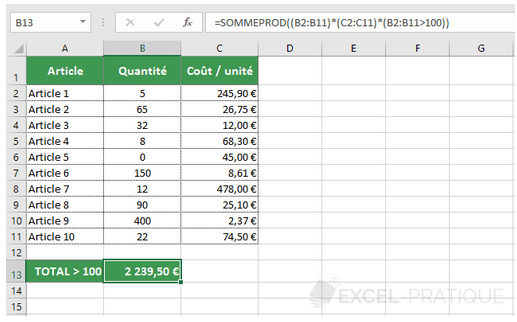
<span style="color: #808080;"><span style="font-family: Cantarell;"><span style="font-size: small;">**Exemple 2** : je veux mon coût total pour les articles vendus, seulement lorsque la quantité vendue dépasse les 100 pièces :</span></span></span>

![image.png](https://librairie.grap.coop/uploads/images/gallery/2024-12/scaled-1680-/jy5image.png)

<span style="color: #000000;"><span style="font-family: Cantarell;"><span style="font-size: small;">**Attention : bien retenir la place des parenthèses, et le fait que chaque partie de formule est reliée à l’autre par le symbole \***</span></span></span>

</details><details id="bkmrk-somme.si-%2F-somme.si."><summary>Somme.si / somme.si.ens</summary>

<span style="font-family: Cantarell;"><span style="font-size: small;">Fait à peu près la même chose que SOMMEPROD ! Lorsqu’il n’y a qu’une seule condition, utiliser SOMME.SI, et à partir de 2, utiliser SOMME.SI.ENS.</span></span>

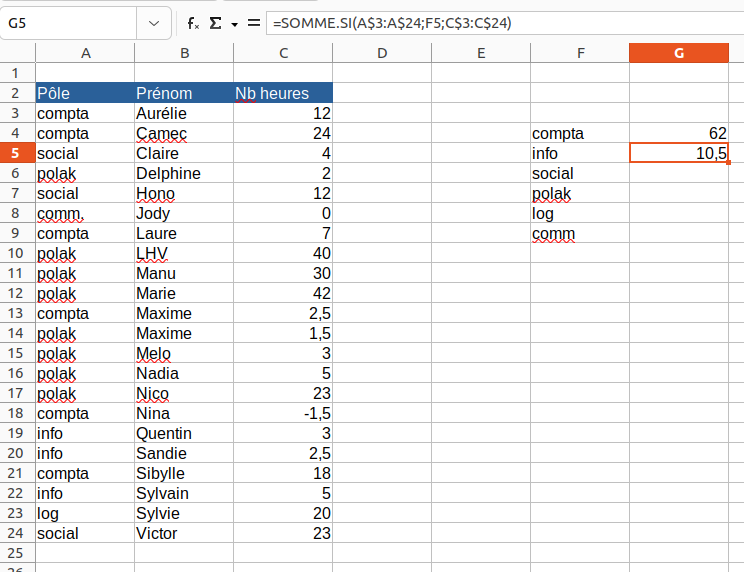
<span style="color: #999999;"><span style="font-family: Cantarell;"><span style="font-size: small;">**Exemple 1** : pareil que ci-dessus, je veux le sous-total des heures sup pour le pôle info :</span></span></span>

![image.png](https://librairie.grap.coop/uploads/images/gallery/2024-12/scaled-1680-/xBVimage.png)

<span style="color: #999999;"><span style="font-family: Cantarell;"><span style="font-size: small;">=SOMME.SI(plage du critère;valeur recherchée;plage à sommer)</span></span></span>

<span style="font-family: Cantarell;"><span style="font-size: small;">SOMME.SI.ENS a 2 critères au minimum, et jusqu’à 127 !</span></span>

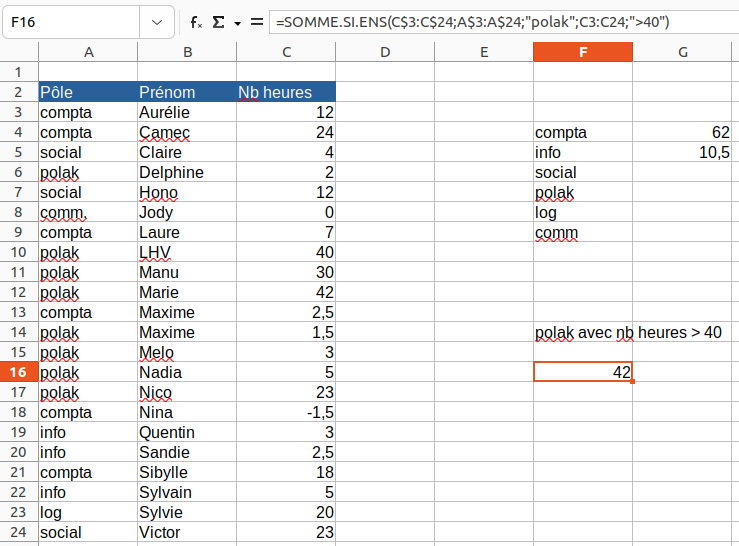
<span style="font-family: Cantarell;"><span style="font-size: small;"><span style="color: #999999;">**Exemple** </span><span style="color: #999999;">**2**</span><span style="color: #999999;"> : </span><span style="color: #999999;">je veux la somme des heures sup pour le polak et seulement pour les personnes pour qui il y a plus de 40h :</span></span></span>

![image.png](https://librairie.grap.coop/uploads/images/gallery/2024-12/scaled-1680-/LP4image.png)

<span style="color: #999999;"><span style="font-family: Cantarell;"><span style="font-size: small;">=SOMME.SI.ENS(plage à sommer;plage du critère 1 ; critère 1 ; plage du critère 2 ; critère 2 ; plage du critère 3 ; critère 3 ; …)</span></span></span>

<span style="color: #999999;"><span style="font-family: Cantarell;"><span style="font-size: small;">NB : dans cet exemple, pour dire supérieur à 40, on écrit « &gt;40 ». Si on avait été dans une sommeprod, on aurait écrit : </span></span></span>

<span style="color: #999999;"><span style="font-family: Cantarell;"><span style="font-size: small;">=SOMMEPROD((C3:C24)\*(A3:A24= « polak »)\*(C3:C24&gt;40))</span></span></span>

</details><details id="bkmrk-sous-total-utile-pou"><summary>Sous-total</summary>

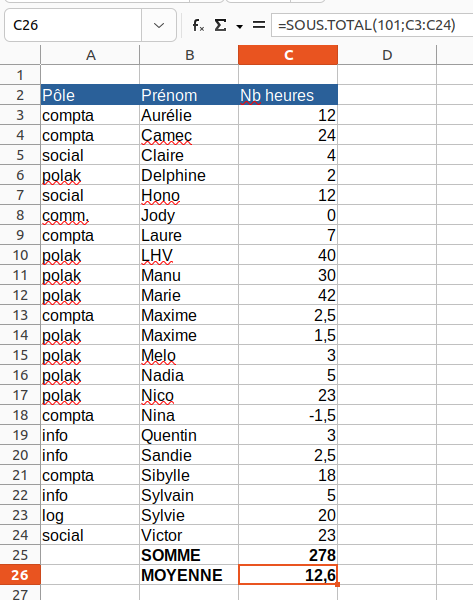
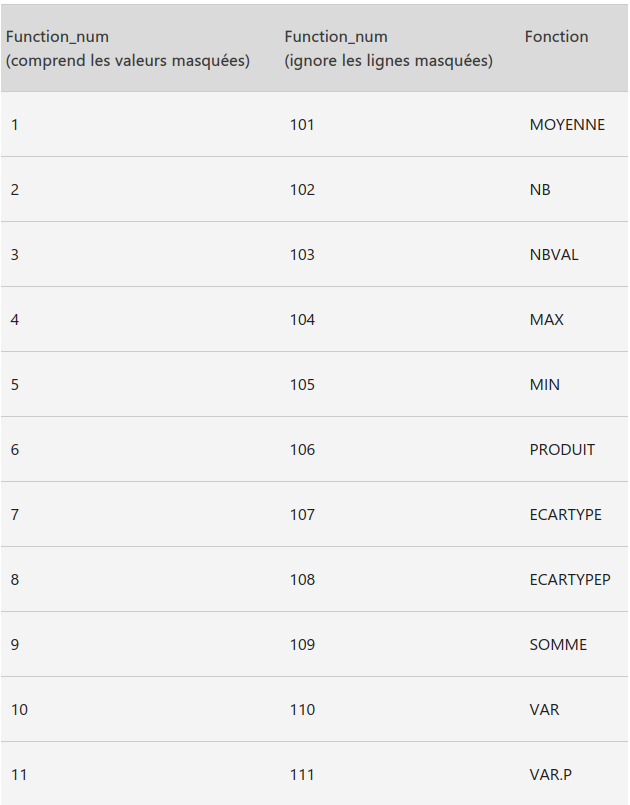
<span style="font-family: Cantarell;"><span style="font-size: small;">Utile pour créer des groupes dans lesquels on peut exécuter des actions telles que SOMME, NB, MOYENNE, PRODUIT, MAX etc.</span></span>

<span style="font-family: Cantarell;"><span style="font-size: small;">Elle se compose comme suit : **SOUS.TOTAL(n° de fonction;plage1;plage2 ;…)**</span></span>

<span style="font-family: Cantarell;"><span style="font-size: small;">Ci-dessous toutes les méthodes (n° de fonctions) possibles : </span></span>
![image.png](https://librairie.grap.coop/uploads/images/gallery/2024-12/scaled-1680-/bILimage.png)

<span style="font-family: Cantarell;"><span style="font-size: small;">Le plus souvent, nous serons sur un sous-total de type SOMME, et donc avec le code méthode 9 (lignes masquées inclues) ou 109 (hors lignes masquées).</span></span>

[![image.png](https://librairie.grap.coop/uploads/images/gallery/2024-12/scaled-1680-/5BSimage.png)](https://librairie.grap.coop/uploads/images/gallery/2024-12/5BSimage.png)

</details><details id="bkmrk-recherchev-%2F-recherc"><summary>Recherchev / Rechercheh / Index Equiv</summary>

<span style="font-family: Cantarell;"><span style="font-size: small;">Ces 3 formules de recherche permettent de rapatrier le résultat d’une cellule à partir d’une valeur recherchée (recherchev ou rechercheh) ou sur une recherche multi-critères (combinaison de index + equiv).</span></span>

- <span style="font-family: Cantarell;"><span style="font-size: small;">Recherchev est utilisé lorsque l’élément recherché est dans une colonne,</span></span>
- <span style="font-family: Cantarell;"><span style="font-size: small;">Rechercheh est utilisé lorsque l’élément recherché est dans une ligne, </span></span>
- <span style="font-family: Cantarell;"><span style="font-size: small;">et la combinaison Index Equiv est par exemple utilisé lorsque l’on recherche une cellule à partir d’un critère en ligne, et un autre en colonne. </span></span>

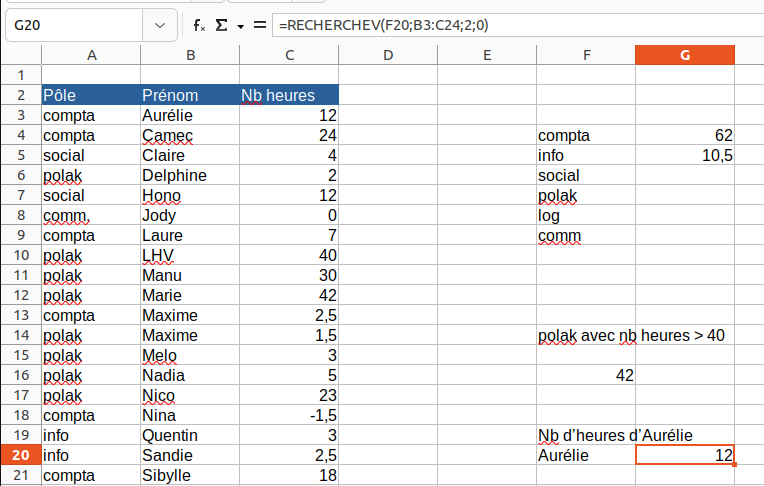
<span style="color: #999999;"><span style="font-family: Cantarell;"><span style="font-size: small;">**Exemple 1** : je veux ramener le nombre d’heures sup d’Aurélie.</span></span></span>

<span style="color: #999999;"><span style="font-family: Cantarell;"><span style="font-size: small;">Mon identifiant commun à la base de donnée de gauche et à la recherche que j’effectue est Aurélie. Je cherche donc Aurélie dans la base de donnée (doit être en 1ère colonne de la plage sélectionnée) et je rapatrie le nombre d’heures (2è colonne à droite à partir du début de ma plage).</span></span></span>

![image.png](https://librairie.grap.coop/uploads/images/gallery/2024-12/scaled-1680-/uMdimage.png)

<span style="color: #999999;"><span style="font-family: Cantarell;"><span style="font-size: small;">=RECHERCHEV(élément recherché;plage dans laquelle sont contenus ET l’identifiant (1ère colonne) ET le contenu à ramener ;n° de colonne dans laquelle se trouve l’élément à ramener;0).</span></span></span>

<span style="color: #999999;"><span style="font-family: Cantarell;"><span style="font-size: small;">Le « 0 » final signifie que l’on accepte pas de réponse proche, seulement le résultat exact.</span></span></span>

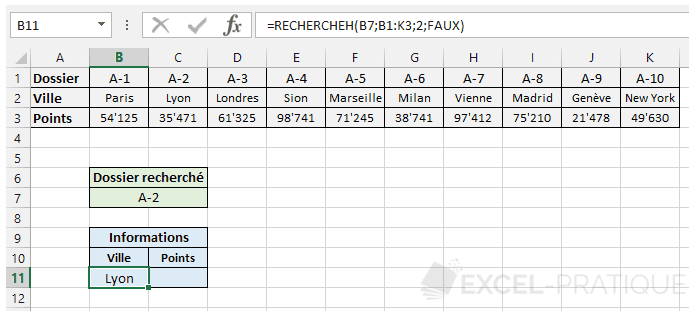
<span style="color: #999999;"><span style="font-family: Cantarell;"><span style="font-size: small;">**Exemple 2** : pour un rechercheh =&gt; ramener la ville associée lorsque le dossier recherché est A-2</span></span></span>

![image.png](https://librairie.grap.coop/uploads/images/gallery/2024-12/scaled-1680-/ImJimage.png)

<span style="color: #000000;"><span style="font-family: Cantarell;"><span style="font-size: small;">La combinaison INDEX + EQUIV</span></span></span>

<span style="color: #000000;"><span style="font-family: Cantarell;"><span style="font-size: small;">Si la fonction EQUIV renvoie le numéro de ligne :</span></span></span>

<span style="color: #000000;"><span style="font-family: Cantarell;"><span style="font-size: small;">**=INDEX(tableau; EQUIV(valeur\_recherchée; plage\_de\_recherche; 0); no\_colonne)**</span></span></span>

<span style="color: #000000;"><span style="font-family: Cantarell;"><span style="font-size: small;">Si la fonction EQUIV renvoie le numéro de colonne :</span></span></span>

<span style="color: #000000;"><span style="font-family: Cantarell;"><span style="font-size: small;">**=INDEX(tableau; no\_ligne; EQUIV(valeur\_recherchée; plage\_de\_recherche; 0))**</span></span></span>

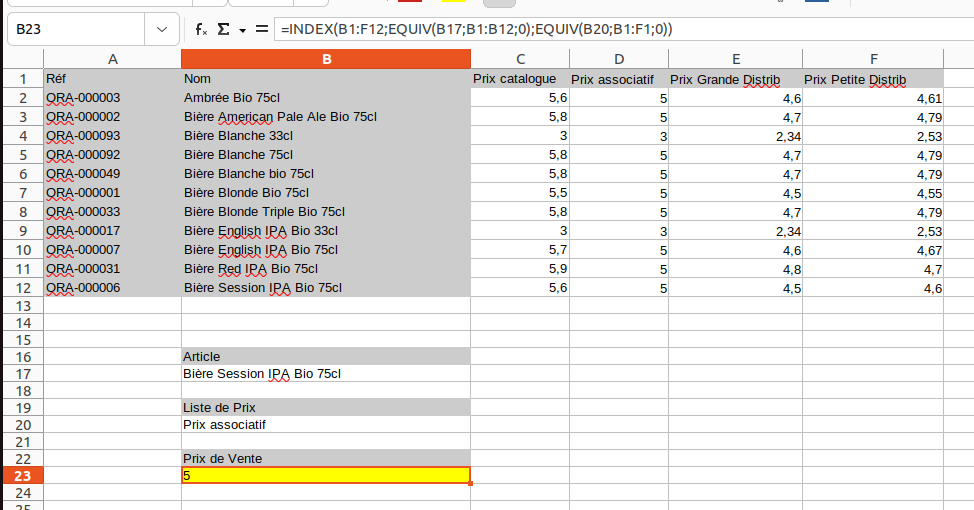
<span style="color: #999999;"><span style="font-family: Cantarell;"><span style="font-size: small;">**Exemple 3 :** <span style="font-weight: normal;">j’ai un tableau à double entrée avec les articles d’une part, et le prix selon plusieurs tarifications (listes de prix) d’autre part. Je veux pouvoir faire varier le prix de vente selon ces 2 critères (on peut imaginer des menus déroulants dans les cases B17 et B20). Ici par exemple, je veux remonter le prix de vente de la Bière Session IPA Bio</span></span></span></span>

![image.png](https://librairie.grap.coop/uploads/images/gallery/2024-12/scaled-1680-/0Vaimage.png)

<span style="color: #999999;"><span style="font-family: Cantarell;"><span style="font-size: small;">La formule se compose comme suit : </span></span></span>

<span style="color: #999999;"><span style="font-family: Cantarell;"><span style="font-size: small;">=INDEX(plage totale du tableau;EQUIV(valeur recherchée en ligne;en-tête de ligne où chercher;0);EQUIV(valeur recherchée en colonne;en-tête de colonne où chercher;0).</span></span></span>

<span style="color: #999999;"><span style="font-family: Cantarell;"><span style="font-size: small;">NB : le 0 signifie que l’on ne veut pas de résultat proche (idem recherchev), mais seulement le résultat exact.</span></span></span>

<span style="color: #999999;"><span style="font-family: Cantarell;"><span style="font-size: small;">Dans les plages d’en-tête ligne ou colonne, il faut inclure B1, sinon on se décale d’une case (il va ramener C11 au lieu de C12 par exemple).</span></span></span>

</details><details id="bkmrk-max%2Fmin-identifie-la"><summary>Max/Min</summary>

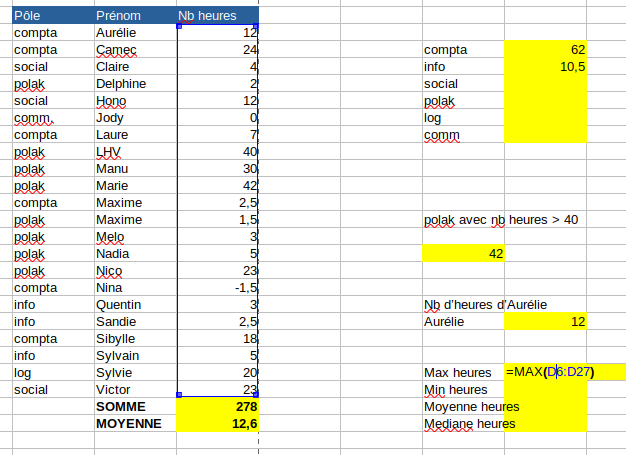
<span style="font-family: Cantarell;"><span style="font-size: small;">Identifie la valeur maximale (MAX) ou minimale (MIN) dans une série.</span></span>

<span style="font-family: Cantarell;"><span style="font-size: small;">S’écrit comme suit : </span></span>

<span style="font-family: Cantarell;"><span style="font-size: small;">=MAX(plage de valeurs) </span></span>

<span style="font-family: Cantarell;"><span style="font-size: small;">=MIN(plage de valeurs)</span></span>

<span style="color: #999999;"><span style="font-family: Cantarell;"><span style="font-size: small;">**Exemple 1** : quelle sont les plus haute / faible valeurs d’heures sup dans l’équipe ? </span></span></span>
![image.png](https://librairie.grap.coop/uploads/images/gallery/2024-12/scaled-1680-/0kzimage.png)

![image.png](https://librairie.grap.coop/uploads/images/gallery/2024-12/scaled-1680-/DXtimage.png)

</details><details id="bkmrk-moyenne-cette-foncti"><summary>Moyenne</summary>

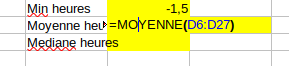
<span style="font-family: Cantarell;"><span style="font-size: small;">Cette fonction calcule une moyenne sur les cellules sélectionnées.</span></span>

[![image.png](https://librairie.grap.coop/uploads/images/gallery/2024-12/scaled-1680-/Qpoimage.png)](https://librairie.grap.coop/uploads/images/gallery/2024-12/Qpoimage.png)

</details><details id="bkmrk-mediane-cette-foncti"><summary>Mediane</summary>

<span style="font-family: Cantarell;"><span style="font-size: small;">Cette fonction calcule la médiane sur les cellules sélectionnées.</span></span>

![image.png](https://librairie.grap.coop/uploads/images/gallery/2024-12/scaled-1680-/VZLimage.png)

</details><span style="font-family: Cantarell;"><span style="font-size: small;">**Conditionnel**</span></span>

---

<details id="bkmrk-si-une-formule-pour-"><summary>Si</summary>

<span style="font-family: Cantarell;"><span style="font-size: small;">Une formule pour se contrôler, rechercher des valeurs correctes / incorrectes, ou ramener un résultat différent selon un ou plusieurs critères. </span></span>

<span style="font-family: Cantarell;"><span style="font-size: small;">La formule se construit comme suit : </span></span>

<span style="font-family: Cantarell;"><span style="font-size: small;">=**SI**(argument;**alors** valeur si vrai;**sinon** valeur si faux). </span></span>

<span style="font-family: Cantarell;"><span style="font-size: small;">La valeur pouvant être un texte (entre guillemets), la valeur d’une cellule, une somme, etc.</span></span>

<span style="font-family: Cantarell;"><span style="font-size: small;">Dans le cas d’un cumul de conditions : </span></span>

<span style="font-family: Cantarell;"><span style="font-size: small;">=**SI**(argument 1;**alors** valeur si vrai;**SI**(argument 2 ; **alors** valeur si vrai;**SI**(argument 3;**alors** valeur si vrai, **sinon** valeur si tout est faux)))</span></span>

<span style="font-family: Cantarell;"><span style="font-size: small;">et on referme toutes les parenthèses à la fin.</span></span>

<span style="color: #808080;"><span style="font-family: Cantarell;"><span style="font-size: small;">**Exemple 1** : vérifier que le prix Grande Distrib est bien inférieur au prix Petite Distrib :</span></span></span>

![image.png](https://librairie.grap.coop/uploads/images/gallery/2024-12/scaled-1680-/cHdimage.png)

<span style="color: #999999;"><span style="font-family: Cantarell;"><span style="font-size: small;">**Exemple 2** : classer les remises du prix associatif par montant selon qu’il n’y en a aucune, une supérieure à 0,5€ ou une inférieure à 0,50€ :</span></span></span>

![image.png](https://librairie.grap.coop/uploads/images/gallery/2024-12/scaled-1680-/dDiimage.png)

<span style="color: #999999;"><span style="font-family: Cantarell;"><span style="font-size: small;">**Exemple 3 :** <span style="font-weight: normal;">convertir un n° de jour de la semaine en libellé jour de la semaine </span></span></span></span>

![image.png](https://librairie.grap.coop/uploads/images/gallery/2024-12/scaled-1680-/Yq9image.png)

</details><details id="bkmrk-sierreur-la-fonction"><summary>Sierreur</summary>

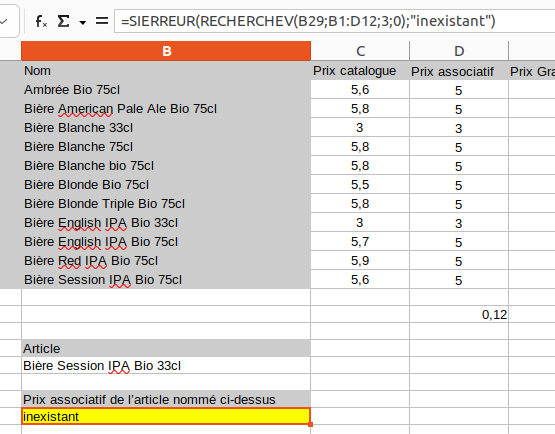
<span style="font-family: Cantarell;"><span style="font-size: small;">La fonction Sierreur permet de dire quoi faire des arguments non vérifiés : une valeur non numérique qui empêche de faire une somme, un recherchev qui ne donne aucun résultat car la valeur recherchée n’est pas dans la base de donnée, etc.</span></span>

<span style="font-family: Cantarell;"><span style="font-size: small;">On est souvent amené à faire un cumul de conditions avec des SIERREUR et des SI.</span></span>

<span style="font-family: Cantarell;"><span style="font-size: small;"><span style="color: #999999;">**Exemple 1**</span><span style="color: #999999;"> : je cherche le prix associatif d’un article en 33cl alors que visiblement il n’existe qu’en 75cl dans le tableau : </span></span></span>

[![image.png](https://librairie.grap.coop/uploads/images/gallery/2024-12/scaled-1680-/ngMimage.png)](https://librairie.grap.coop/uploads/images/gallery/2024-12/ngMimage.png)

</details><span style="font-family: Cantarell;"><span style="font-size: small;">**Format / Mise en forme / Intervention sur du texte**</span></span>

<details id="bkmrk-concat-parfois-on-a-"><summary>Concat</summary>

<span style="font-family: Cantarell;"><span style="font-size: small;">Parfois on a besoin de regrouper plusieurs cases en une seule : ça peut permettre de créer un identifiant unique (ref article + libellé + fournisseur) pour réaliser un RECHERCHEV par exemple. La formule CONCAT est faite pour ça !</span></span>

<span style="font-family: Cantarell;"><span style="font-size: small;">Elle peut se remplacer par le symbole &amp;.</span></span>

<span style="font-family: Cantarell;"><span style="font-size: small;">NB : se pratique sur tous types de formats de cellule (texte, mais pas que !).</span></span>

<span style="color: #999999;"><span style="font-family: Cantarell;"><span style="font-size: small;">**Exemple 1** : fusion de la référence de l’article et du libellé, en insérant un espace entre les 2 pour plus de lisibilité : </span></span></span>

![image.png](https://librairie.grap.coop/uploads/images/gallery/2024-12/scaled-1680-/Fy1image.png)

</details><details id="bkmrk-gauche-%2F-droite-ces-"><summary>Gauche / Droite</summary>

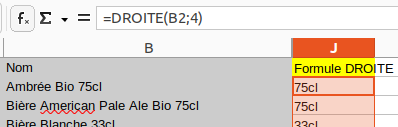
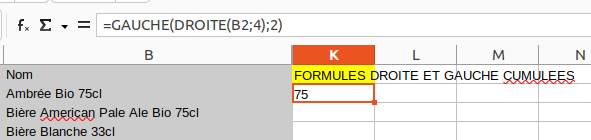
<span style="font-family: Cantarell;"><span style="font-size: small;">Ces formules servent à casser un libellé pour ne garder que les 1<sup>ers</sup> ou derniers caractères. Si l’on veut des caractères situés entre le début et la fin (mais toujours placé pareil), on peut cumuler les 2 :</span></span>

<span style="color: #999999;"><span style="font-family: Cantarell;"><span style="font-size: small;">**Exemple 1** : récupérer les 4 derniers caractères des libellés des bières pour savoir s’il s’agit de 33 ou 75cl :</span></span></span>

![image.png](https://librairie.grap.coop/uploads/images/gallery/2024-12/scaled-1680-/LS3image.png)

<span style="color: #999999;"><span style="font-family: Cantarell;"><span style="font-size: small;">**Exemple 2** : retirer « cl » pour convertir en nombre et pouvoir faire un calcul de prix de vente par litre par exemple : </span></span></span>[![image.png](https://librairie.grap.coop/uploads/images/gallery/2024-12/scaled-1680-/JQCimage.png)](https://librairie.grap.coop/uploads/images/gallery/2024-12/JQCimage.png)

</details><span style="font-family: Cantarell;"><span style="font-size: small;">**Date**</span></span>

<details id="bkmrk-aujourdhui%28%29-renvoie"><summary>Aujourdhui()</summary>

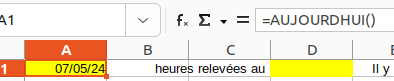
<span style="font-family: Cantarell;"><span style="font-size: small;">Renvoie la date du jour. </span></span><span style="font-family: Cantarell;"><span style="font-size: small;">S’écrit comme suit : </span></span><span style="font-family: Cantarell;"><span style="font-size: small;">=AUJOURDHUI()</span></span>

![image.png](https://librairie.grap.coop/uploads/images/gallery/2024-12/scaled-1680-/rS5image.png)

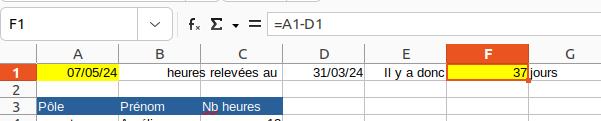
<span style="font-family: Cantarell;"><span style="font-size: small;">Permet de faire des calculs de délais entre une date 1 dans votre tableur, et la date du jour par exemple (juste par soustraction, voir exemple ci-dessous).</span></span>

<span style="color: #999999;"><span style="font-family: Cantarell;"><span style="font-size: small;">**Exemple 1** : mon relevé des heures à récupérer date du 31/03/2024, je veux calculer l’âge de ce relevé à l’ouverture du document, dans l’idée qu’au delà d’un certain nombre de jours, il devient désuet.</span></span></span>

![image.png](https://librairie.grap.coop/uploads/images/gallery/2024-12/scaled-1680-/nhjimage.png)

</details><details id="bkmrk-mois.decaler-permet-"><summary>Mois.decaler</summary>

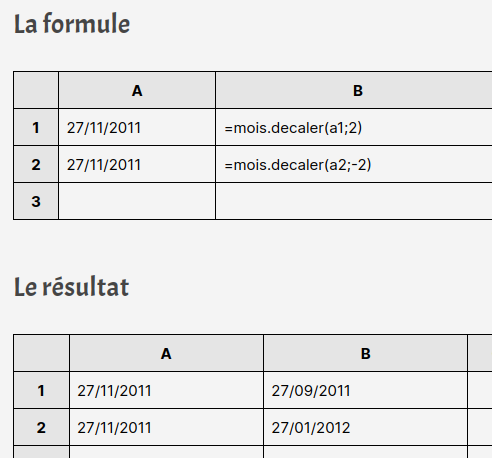
<span style="font-family: Cantarell;"><span style="font-size: small;">Permet de générer une date à partir d’une autre, en avançant / reculant de x moi</span></span>s

![image.png](https://librairie.grap.coop/uploads/images/gallery/2024-12/scaled-1680-/K8qimage.png)

</details><details id="bkmrk-fin.mois-cette-fonct"><summary>Fin.mois</summary>

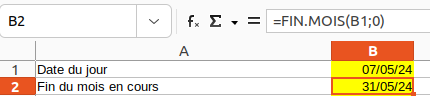
<span style="font-family: Cantarell;"><span style="font-size: small;">Cette fonction amène le dernier jour du mois pour une date donnée. Là encore, on peut s’en servir pour calculer des délais entre 2 dates (exemple : aujourd’hui et la fin du mois), ou mettre des échéances (ex. la facture doit être payée avant la fin du mois) associées à des alerteurs (par exemple visuels, via la mise en forme conditionnelle) lorsque l’échéance est dépassée.</span></span>

<span style="color: #999999;"><span style="font-family: Cantarell;"><span style="font-size: small;">**Exemple 1** : ramener le dernier jour du mois en cours : </span></span></span>
![image.png](https://librairie.grap.coop/uploads/images/gallery/2024-12/scaled-1680-/I78image.png)

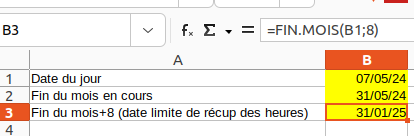
<span style="color: #999999;"><span style="font-family: Cantarell;"><span style="font-size: small;">**Exemple 2** : ramener le dernier jour du mois de « dans 8 mois » (qui serait par exemple la date limite pour récupérer) :</span></span></span>

![image.png](https://librairie.grap.coop/uploads/images/gallery/2024-12/scaled-1680-/LqUimage.png)

</details><span style="font-family: Cantarell;"><span style="font-size: small;">**Autre**</span></span>

<details id="bkmrk-rang-permet-de-class"><summary>Rang</summary>

<span style="font-family: Cantarell;"><span style="font-size: small;">Permet de classer des résultats numériques (croissant ou décroissant). Pour faire par exemple un top ou flop articles ou autre.</span></span>

</details>